What to Eat App: Which Kind Fits Your Hungry Moment?
In short
- A what to eat app can be one of five kinds: recipe planners, delivery apps, map and review apps, wheels, or question-based pickers.
- Each kind is built for a different moment, and each one stalls somewhere. The table below shows where.
- Use one app to decide and another to fetch. Decide the dish first, then open the delivery or map app to get it.
- If you already know what you want, skip the apps and go get it.

Search your phone’s app store for a what to eat app and you’ll get a mixed bag. Meal planners, delivery apps, restaurant maps, spinning wheels. They all claim to help you decide, but they help with different parts of the job.
Picking the wrong kind is how deciding turns into scrolling. So before choosing an app, it helps to know which part of the decision you’re actually stuck on.
What is a what to eat app?
A what to eat app is any app you open to settle what you’re eating. They come in five kinds: recipe and meal planners, delivery apps, map and review apps, wheels and random pickers, and question-based pickers. Each kind is built for a different moment, so the right one depends on where you’re stuck.
Two of the five weren’t designed to choose for you at all. Delivery and map apps are built to show you everything available. That’s their strength when you know what you want, and their weakness when you don’t.
Which kind of what to eat app should I use?
Use a recipe planner when you’re planning meals ahead, a delivery or map app when you already know the dish, and a wheel when you’re down to a few options. Use a question-based picker when you don’t know what you want and need a short list from places near you.
| Kind of app | Built for | You give it | It hands back | Where it stalls |
|---|---|---|---|---|
| Recipe and meal planner | Planning the week’s cooking | Tastes, diet, sometimes what’s in the fridge | Recipes and a shopping list | Tonight, when you’re already hungry and missing an ingredient |
| Delivery app | Ordering in | Your address | Every place that delivers | A long feed when you don’t know what you want |
| Map and review app | Going out | A location or a search | Places with ratings and photos | It compares places, not dishes |
| Wheel or random picker | Breaking a tie | A list of options | One random pick | It knows nothing about you, so it’s only as good as the list |
| Question-based picker | Not knowing what you want | A few answers about your mood and limits | A short list of dishes from nearby places | It needs your location, and it won’t cook for you |
Read the last column first. If you’ve been stuck in one of those spots tonight, you’ve been using the wrong kind of app for this moment. Someone scrolling a delivery feed with no idea what they want is the clearest case. That app is built to fetch the food once you’ve chosen it.
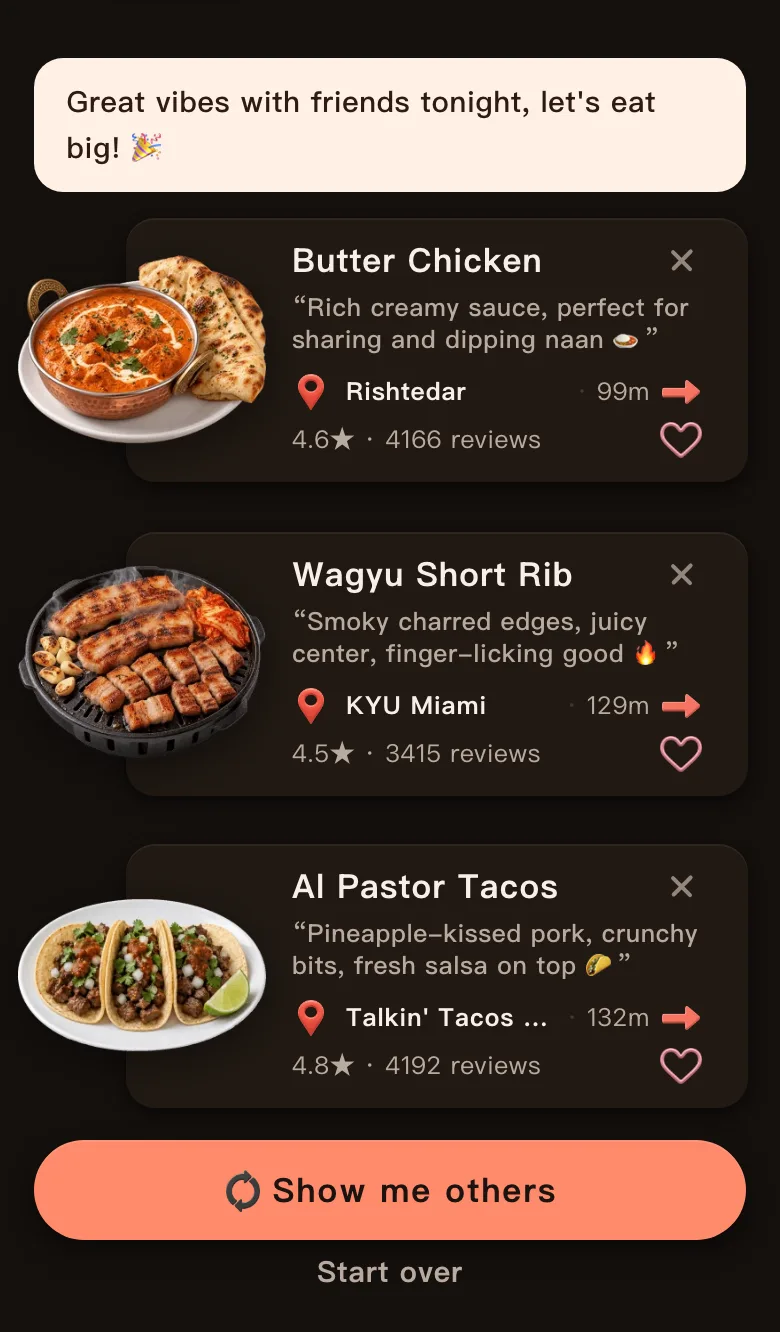
Today’s Mealow is the question-based picker I build, so I tested the hardest case for that row: giving it almost nothing. With the location set to Wynwood in Miami, I answered Anything for both cuisine and flavor. The one real answer was With friends. The cat opened with “Great vibes with friends tonight, let’s eat big!” It offered butter chicken, a wagyu short rib and al pastor tacos, all within 132 m. Three cuisines, all sized for a group dinner.
Is there an app that tells you exactly what to eat?
The app that tells you exactly what to eat, down to one dish, is usually a wheel or random picker, and its pick is random. Question-based pickers come closer to your taste but hand back a short list, so you make the last call. That call is quick, because every option already fits.
A single pick you dislike sends you back to the start. Three picks that all fit your answers let you choose with a glance, and the choice still feels like yours.
Today’s Mealow works that way. Its six questions cover the cuisine, the meal, how you’re feeling, the flavor, who you’re with and where, and anything you skip. From those answers it picks 3 dishes from real places near you, with a one-line reason for each. Tap “Show me others” for a new set of three. The web version is free, works in English and Chinese, and needs no install. There’s also a WeChat Mini Program.
How do I use two apps without scrolling all night?
To use two apps without endless scrolling, give each one a single job. One app decides the dish, the other fetches it. Settle the dish with a picker, a wheel or your own short list, then open the delivery or map app and search for that dish by name.
Searching by dish name skips the home feed, which is where the scrolling happens. Here’s how it looks with my Miami results. Say the table picks the al pastor tacos. Searching a map app for “al pastor” shows the taco places nearby, and you compare two or three of them instead of the whole neighborhood.
The same split works with a wheel. Put four dishes you’d happily eat on the free food wheel, spin once, and then open the delivery app with the winner already chosen. If you’d rather decide on a kind of restaurant than a dish, the random restaurant generator does that part, and the map does the rest.

Need the deciding half? Answer a few questions and Today’s Mealow picks 3 dishes from real places near you. Then open whichever app you use to get there.
Pick the dish firstWhat’s the best app for choosing where to eat with friends?
For choosing where to eat with friends, the best app is one everyone can see at once. A shared wheel works well: one person fills it with places the group already agrees on, sends the link, and anyone can spin. The result stands because everyone saw the list first.
The food wheel here has a Copy share link button. The link holds your current list, so friends open the same wheel on their phones. Fill it before anyone is hungry, and the group chat goes from “I don’t mind, you pick” to one spin.
If the group can’t even agree on a list, collect everyone’s hard no’s first. The five-line brief covers how to merge them before anyone suggests a place.
When is it better not to use an app at all?
Skipping the apps is better when you already know what you want. The same goes for cooking from what’s in the fridge, or a place you trust right around the corner. An app only helps when the choice is open. A closed choice just needs doing.
Watch for the moment you open an app out of habit. If a dish was already on your mind before you unlocked the phone, that’s your answer. Go and get it, and save the apps for nights when nothing comes to mind.
What else should you know about apps for choosing food?
Do I need to download anything to get help deciding what to eat?
Not always. Many food pickers and wheels run in a web browser with nothing to install. The wheels and generators on this site all work that way.
How do I stop scrolling the delivery feed?
A delivery app shows you every place that delivers, so with no dish in mind you’re browsing all of them. Opening it with a dish already chosen turns that long feed into a short search.
Should I use a meal planner for tonight’s dinner?
A meal planner is built for the week ahead, and tonight’s dinner needs a quicker answer. Use the planner on a calm afternoon, then follow the plan when you’re hungry.
What’s the difference between a food wheel and a food picker?
A food wheel spins through a list you can see and edit. A food picker usually draws one option from its own list, often with filters. Both are random, so neither knows your tastes.